
Nama
Easy multitrack recording with Ecasound
Welcome to Nama!
Nama manages multitrack recording, mixing and mastering using the Ecasound audio processing engine developed by Kai Vehmanen.
Nama's high-level representation of tracks, buses and signal-routing handles most common recording scenarios.
The command language provides full functionality to console users, while a simple GUI is available for basic recording and mixing work.
Nama's GUI is ugly. There, I've said it. At least, you can change the default colors.
On the positive side, the GUI offers basic functionality: recording, playback, effects, marks. Sliders are a convenient way of setting effect parameters. You'll use text commands to do fancy stuff like buses, inserts, regions, etc.
The first group of shots show the mixer window. All of those letters on the right side of the track display (EF P1 P2 L1 L2 L3 L4) are buttons for accessing Ecasound effects, Ecasound presets, and LADSPA plugins. The GROUP control below the Mixdown track is a global setting that influences all user tracks. The Palette and Namapalette buttons on the upper right are for selecting colors.
Mixer Window - Rec
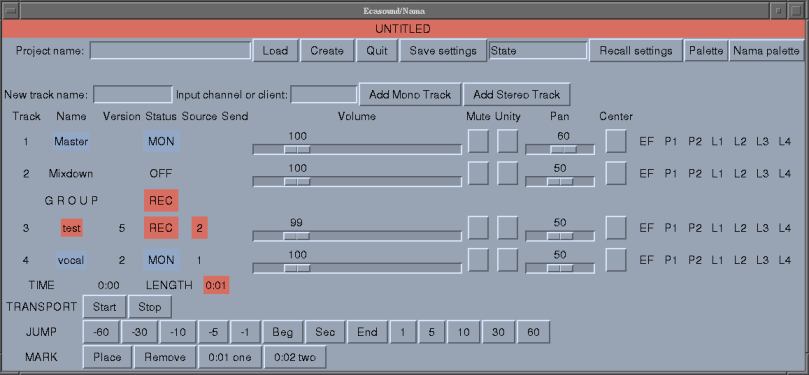
The track in red is ready to record a file track_4.wav from soundcard input 2, the track in blue is set to play back vocal_2.wav. (The version number is automatically incremented.) Red in the top band indicates a live input will be recorded. Yellow means mixdown pending, green means playback only.
The Effects Window - Basic
Ecasound and LADSPA provide Nama's effects-processing. At the bottom, a MIDI controller is applied to control the delay time of a flanger effect on the guitar track. At the top, a reverb effect is applied to what is now called the Master track. Additional effects on a track scroll off to the right.

Text Display
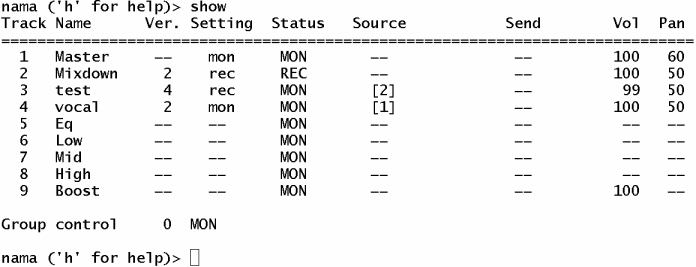
Like Ecasound, Nama can be run entirely from a terminal. Here is the output of
the show_tracks command, with mastering mode enabled. (Most commands have
abbreviations. show_tracks can be abbreviated to show.)
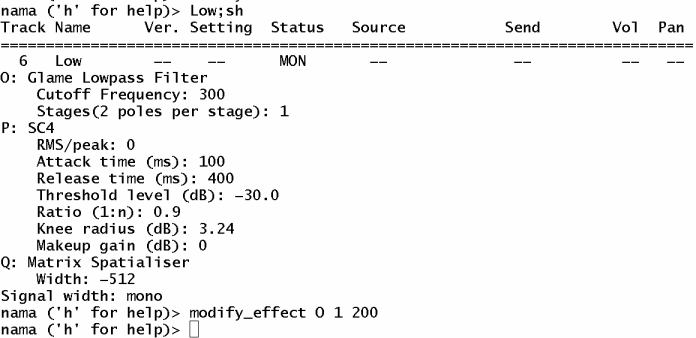
Information about one track is displayed with the show_track (sh) command.
Here is the display for the low-frequency branch of the mastering network. The
command being typed at the prompt sets the first parameter of effect "O" (the
lowpass filter) to 200 Hz.
The help screen is two keystrokes away.
Nama now uses Graph objects to represent the signal routing. I made some diagrams based on these routing graphs. They are kind of cool to look at. The layout was done automatically, not exactly what you'd expect in hand-drawn diagrams.
Here is the signal flow for recording a single track against an accompaniment. The signals are mixed and output for monitoring. Effects are applied between track input and output.
Here is the signal flow for mastering a song of three tracks. The guitar signal passes through an external JACK program, jconv.
The soundcard output is usually turned off during mixdown so that engine can run in freewheeling mode.
Features
Convenient multitrack audio production
Simple setup for recording, playback, effects processing and mixdown.
Multiple WAV files (aka takes) for each track.
Non-destructive processing
Advanced functionality
Mastering mode with signal paths for low, mid-range and high bands
Time shifting of tracks and track regions
Track caching/freezing/bouncing to reduce CPU usage with long effects chains and large projects
Buses
Inserts
Submixes (aux sends)
JACK and ALSA support
Basic functions operate under both JACK and ALSA
Manual or automatic JACK client connections
Ladish Level 1 session handling support
Plugin support
LADSPA and LV2 plugins
Ecasound chain operators, presets and controllers
New plugins and presets are automatically detected.
Plugins are queried for parameter ranges and default settings
Linear and logarithmic scaling for parameter sliders
Effect chains (multieffect presets)
Effect profiles (multitrack presets)
GUI
One mixer window for transport controls, track settings, and project load/save
One effects window
Includes command prompt in terminal window
No dialog boxes considered a feature
Avoids window-overload syndrome
Full-featured Text UI
Text interface based on grammar and recursive descent parser
Economical command language.
sax vol + 10does what one would expect.Commands can apply to several tracks at once:
for piano guitar; vol - 20Tracks can be grouped in bunches
bunch strings violins violas cellos bassfor strings; pan + 5A single
modify_effectcommand can adjust multiple effects and/or multiple parametersTab-completion of commands, plugin labels, and project names
Command prompt executes Nama commands, Ecasound interactive mode commands, shell commands, and Perl code
Command history
Suitable for console users, and for remote or headless systems
Help system
help by command category
search for commands by name, partial name or shortcut
search for effects by keywords, effect label or LADSPA index
Stable
Signal processing is performed by Ecasound, a mature, stable and respected multitrack audio processing engine.
Ecasound chain setups can be inspected prior to recording runs to verify signal routing and audio format parameters.
Project state is stored in JSON, a legible file format
Limitations
No graphic waveform display at the moment.
Text commands needed to access some functions.
Signal routing changes require stopping the engine.
Compensation for latencies associated with effects and loop devices in signal paths is planned.
####Q. Why another digital recording software? Aren't there enough already?
A. There are never enough audio applications. Just like good restaurants, there is always room for one more.
Also, Nama is text-based. It can run in a console. This can be useful for several reasons:
- you are a console user, and don't want to run X
- you want to reduce the CPU load on your computer while processing audio
- you want to avoid interrupt conflicts between your audio and video adapters
Q. Why bother to reinvent the wheel?
A. Nama absolute avoids reinventing the wheel! All audio processing for Nama is performed by Ecasound, by LADSPA plugins, and by external programs such as jconverter.
Most of the computer science goodness in Nama is from CPAN, a huge archive of freely available software libraries written in Perl. So that's reuse, too. :-)
Q. Why is Nama written in Perl? Everyone knows that Python or Ruby would be easier to read, C++ would be faster, C# or [insert your preferred language here] would be cooler, etc.
A. No answer, really. Just a personal preference.
Q. Why not just use Ecasound directly? Why do you need a complicated front-end like Nama?
A. Nama adds convenience. Ecasound has no concept of a track, mixer, or bus. Whatever you need, you must build out of chains, objects and operators, which is time-consuming for complicated setups. Nama gives you all that and more with just a couple of commands.
Q. Can you really record/mix/master without a GUI?
A. Yes, if you're willing to use your ears. :-)
I could suggest mhwaveedit if you need a simple app to visualize a waveform.
Q. How does Nama/Ecasound compare to Audacity?
A. Unlike Audacity, Nama applies effects in real time by default. A reverb effect can be applied to a stream as it is played back or arrives from the soundcard. To save CPU, Nama also has a track-caching (track-freezing) function similar to the way Audacity batch preprocesses each track as you apply an effect.
Q. What super-cool features does Nama have?
Almost all of Nama is awesome.
Effect chains and effect profiles. They are like presets. Effect chains are for one track and can include several effects. Effect profiles are for multiple tracks.
Inserts with wet/dry control are cool.
Auto fades on transport start/stop are cool.
The command language allows a single command to be executed on multiple tracks, multiple effects, and/or multiple effect parameters.
The help system covers LADSPA effects and Nama commands. Commands can be listed by category. Commands and effects can be searched by keyword.
Q. What about bugs? Is Nama suitable for recording the
Boston Symphony Orchestra, or will it crash and burn?
A. Ecasound is a mature and reliable audio engine that has been thoroughly tested. So Nama inherits all that. Although Nama's own logic is vulnerable to bugs, many have been beaten out from under Nama's carpets. A basic test suite now ensures that patches and new features can be applied somewhat safely.
Several other design features help keep Nama reliable:
Ecasound chain setups can be reviewed to verify correct routing and IO.
All system state is stored in user-readable YAML text files that you (or I) can examine in case you find some strange behavior.
Nama has a debug mode available to track down problems.
Ecasound can be started in server mode with debugging enabled, so that all command IO is visible.
Use of a separate configuration file with reasonable default behavior ensures that configuration decisions are deliberate and will not change as the result of an errant mouse click.
Object-oriented design has helped organize Nama's source code, encapsulate data, and handle the complexities of signal routing.
Q. Ardour kicks ass, so why would I want to use Nama?
Nama is easy to learn and minimal. It can run without X and without JACK. If you want the kitchen sink, Ardour is for you.
Q. Why didn't you choose Ardour as audio engine, using the scripting interface?
A. When I started writing Nama, Ardour was a beast to build, it segfaulted all the time, and there was no support for building alternative user interfaces. Ecasound is stable, works with or without JACK, and is designed to interface with other software.
Releasing v1.203
I am happy to announce Nama version 1.203. With this release, the effects-handling code has been fully converted to Nama's OO model and several issues resolved.
For users, the add-effect and remove-effect commands will now work on effect chains as well as simple effects. Effects can be addressed by effect ID, user alias or effect code. Some bus-related commands have been renamed to conform standard terminology.
For those who care to prod and hack the sources, Nama's variables, defined in src/var*, are now documented in varoverview.
I welcome feedback from any tire-kicking, torture-testing etc.
Ongoing Improvements - now at Version 1.102
Nama has continued to evolve.
Git support has been integrated. It is now the preferred way to manage projects, as it allows branching and returning to a previous state. For easy transition Nama offers save/get commands that work with branch names the way you would expect to work with files.
Adopting Git has led to changes in serialization. For each project, git tracks one file (State.json) containing data that directly affects project audio. Track and version comments, and other peripheral data is stored separately.
Effect chains and profiles have been re-implemented in a much cleaner way, and may include inserts as well as effects and controllers.
For user convenience, times can be specified in samples as well as seconds. Underlying storage is as double-precision floats with 15-17 significant figures.
(March 4, 2013)
Julien Claassen's Nama pages
Julien has been Nama's number-one tester, and his feature requests are behind many of Nama's newer abilities.
He's writing his own pages about Nama. Right now it's mostly links to his music.
Lately he's been using Leslie IR files with jconv to give Leslie sound to his organ recordings. Nama's cache_track function makes it possible for him to free up CPU by preprocessing those files.